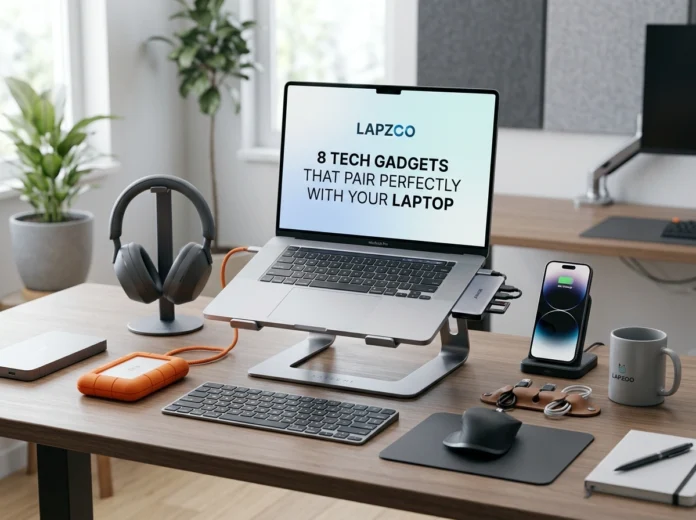
Your laptop is a powerful tool, but it rarely works at full potential on its own. Whether you work from a home office in Austin, hop between coffee shops in Seattle, or split your time across a hybrid schedule in New York, the right accessories can transform how you work, create, and play.
Across the United States, more people than ever rely on laptops as their primary computer. With that shift comes a growing demand for gadgets that fix common pain points: cramped screens, slow connections, sore necks, and noisy environments. The good news? A handful of smart additions can solve all of these problems.
Below, we break down eight tech gadgets that pair beautifully with any laptop. Each one delivers real benefits for productivity, remote work, and everyday computing.
1. Laptop Stand
A laptop stand might be the simplest upgrade on this list, but it makes a huge difference. By raising your screen to eye level, a stand encourages better posture and reduces the strain on your neck and shoulders.
Key benefits:
- Improves posture and reduces back and neck pain
- Boosts airflow, helping your laptop run cooler
- Frees up desk space and creates a cleaner setup
Why it pairs well with your laptop: Most laptops sit too low for comfortable typing. A stand fixes that instantly, especially when combined with an external keyboard and mouse. For anyone spending long hours at a desk, this gadget protects your health while keeping your machine cool.
2. USB-C Hub
Modern laptops are sleek and thin, which usually means fewer ports. A USB-C hub solves that problem by expanding your connections in one compact device.
Key benefits:
- Adds HDMI, USB-A, SD card, and Ethernet ports
- Supports fast charging through pass-through power
- Lets you connect multiple devices at once
Why it pairs well with your laptop: If you constantly swap cables to connect a monitor, transfer photos, or plug in a flash drive, a hub ends that frustration. It turns a single port into a full command center, which is ideal for creators and remote professionals juggling several devices.
3. Wireless Mouse
Trackpads are convenient, but they can’t match the precision and comfort of a quality wireless mouse. For detailed work, a mouse is a must-have.
Key benefits:
- Offers smoother, more accurate control
- Reduces wrist fatigue with ergonomic shapes
- Connects easily over Bluetooth or USB receiver
Why it pairs well with your laptop: Editing spreadsheets, designing graphics, or simply browsing feels faster with a real mouse. A wireless model keeps your workspace tidy and travels well, so you can stay productive anywhere from a home office to an airport lounge.
4. Mechanical Keyboard
If you type for hours every day, your keyboard matters. A mechanical keyboard delivers tactile feedback and durability that built-in laptop keys can’t.
Key benefits:
- Provides satisfying, responsive keystrokes
- Lasts far longer than standard keyboards
- Improves typing speed and accuracy over time
Why it pairs well with your laptop: Pairing a mechanical keyboard with a raised laptop stand creates an ergonomic dream setup. Writers, programmers, and data-heavy professionals will notice less fatigue and more comfort during marathon work sessions.
5. HD Webcam
Built-in laptop cameras often disappoint, especially in low light. With video calls now a daily reality for millions of American workers, a dedicated HD webcam is a smart investment.
Key benefits:
- Delivers sharp, clear video quality
- Performs better in dim lighting
- Offers wider angles and adjustable framing
Why it pairs well with your laptop: When you’re leading a client meeting or recording content, you want to look professional. An external webcam clips onto your monitor or stand and instantly upgrades how you appear on screen, building trust with colleagues and customers alike.
6. Noise-Canceling Headphones
Distractions are everywhere, whether you’re working from a busy household or a crowded café. Noise-canceling headphones help you focus and communicate clearly.
Key benefits:
- Blocks out background noise for deep focus
- Delivers crisp audio for calls and music
- Includes built-in microphones for clear conversations
Why it pairs well with your laptop: Remote work depends on clear communication. These headphones let you join video calls without echo or background chatter, while also creating a quiet bubble for concentrated work. They’re a favorite among hybrid workers across the country.
7. Portable Monitor
Once you experience a dual-screen setup, going back feels limiting. A portable monitor gives you extra screen space without tying you to a desk.
Key benefits:
- Doubles your workspace for multitasking
- Lightweight and slim for easy travel
- Connects quickly with a single USB-C cable
Why it pairs well with your laptop: A portable monitor is perfect for spreadsheets, coding, or comparing documents side by side. It folds up like a tablet, so you can carry it between locations and enjoy a full workstation wherever you land.
8. Laptop Bag or Sleeve
Protecting your investment is just as important as enhancing it. A quality laptop bag or sleeve keeps your device safe while you’re on the move.
Key benefits:
- Shields against scratches, bumps, and spills
- Offers organized storage for cables and accessories
- Combines style with everyday durability
Why it pairs well with your laptop: Whether you’re commuting through Chicago traffic or flying cross-country, a well-made bag guards your laptop and accessories. The right sleeve adds peace of mind without adding bulk, making it an essential for anyone always on the go.
Build the Perfect Setup
These eight gadgets work together to create a smarter, more comfortable, and more productive workspace. A stand and keyboard improve your posture. A hub and portable monitor expand your capabilities. Headphones and a webcam sharpen your communication. And a reliable bag keeps everything protected.
The beauty of these accessories is that you can add them gradually. Start with one upgrade that solves your biggest pain point, then build from there. Over time, you’ll create a setup tailored to exactly how you work and live.
When you’re ready to shop, quality matters. Choosing well-made, dependable accessories ensures your gadgets last and perform as promised. You can explore a wide range of laptop accessories and tech gadgets at lapzoo.com, where you’ll find options designed to fit different budgets and needs.
Final Thoughts
Your laptop is the heart of your digital life, but the right accessories help it reach its full potential. From boosting comfort and focus to expanding screen space and protecting your device, each gadget on this list addresses a real need for today’s busy professionals, students, and creators.
Investing in smart, durable add-ons pays off every single day. So take a look at your current setup, identify what’s missing, and start building a workspace that works as hard as you do. With the right tools by your side, you’ll work smarter, feel better, and get more done, no matter where the day takes you.